My Piantor Experience
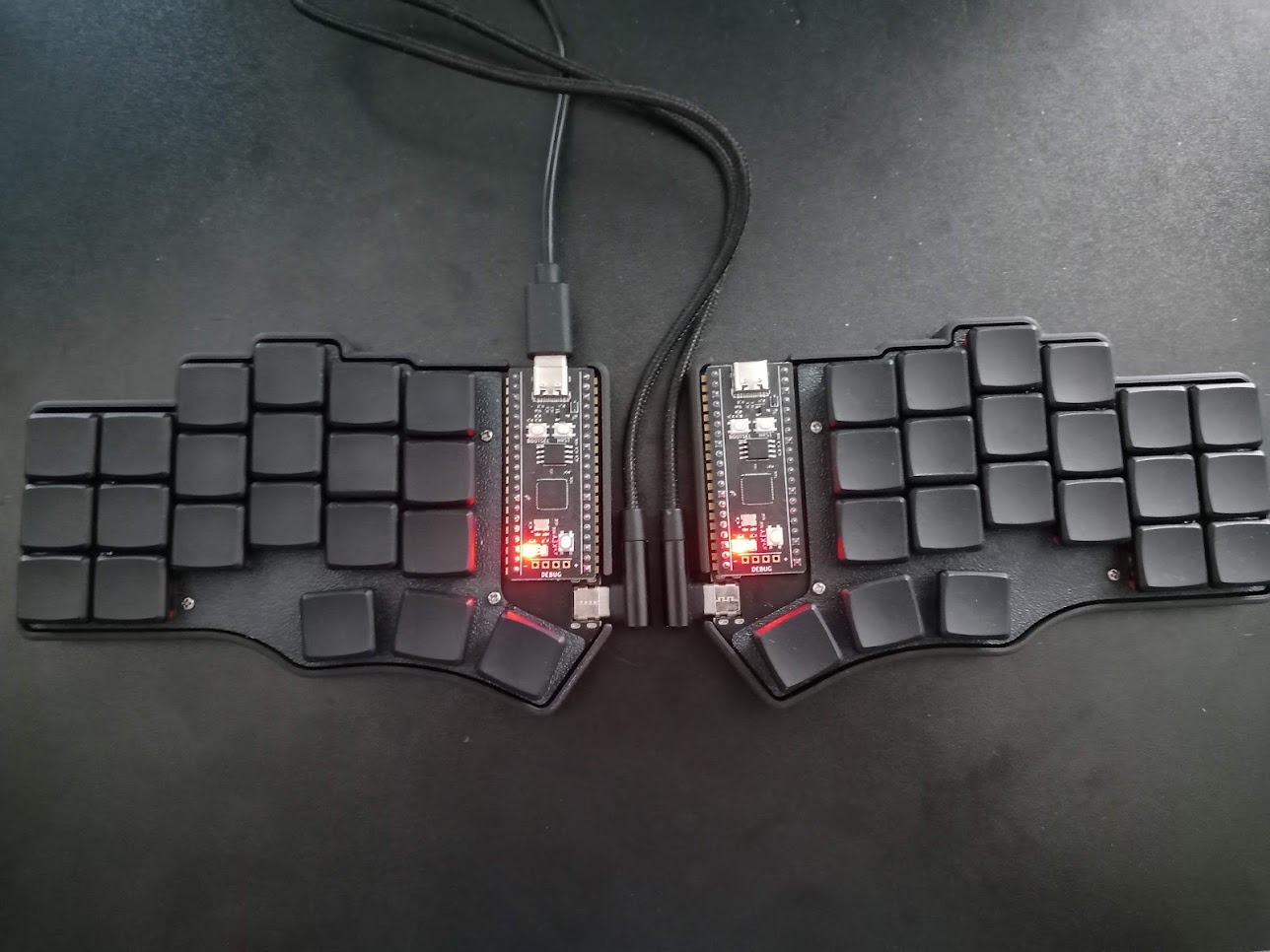
In the summer of 2023 I got Piantor, my first and only ergonomic mechanical keyboard. In this article I'll go over what it is, why I got it in the first place, my experience of daily-driving it for over two years and whether I can recommend it.
Why
I had to get a new keyboard for my home office. At the time, every other YouTube channel I followed was either showcasing or just silently flexing their fancy keyboards and I really wanted to understand what all the rage was about.
To be honest, most of the keyboards I saw were just overpriced versions of the standard keyboards. The traditional row-staggered layouts were complemented by programmable firmware and mechanical switches, but, otherwise, they weren't too dissimilar to the regular keyboards I could get at a local computer store for 20 bucks. If I was to invest more than that into a keyboard, I'd prefer it to actually be different in a meaningful way.
This is where ergonomic keyboards come in. These are designed to provide a more comfortable typing experience by incorporating some combination of these features:
- split design
- tenting
- column-staggered or ortholinear layout
- concavity wells
- thumb key clusters
Most of the above are meant to keep your wrists in a more natural position. Others are meant to reduce the range of movement required. In both cases, this is supposed to help prevent carpal tunnel syndrome.
I was sold. The most annoying part of traditional keyboards for me was always the amount of travelling my fingers had to do to reach Escape or Backspace keys. Another design flaw, that now seemed apparent, is the poor utilization of thumbs. Evolution gave us two of these strong dexterous fingers, yet we're only using them to press a single Space key.
Now it was just a matter of picking one.
What
After a not-so-long search, I ended up with Piantor. The main features include:
- open-source
- split
- 42-key columnar layout
- programmable
- customizable
The open-source aspect consists of the fact that the files for the PCB and the case are available for anyone to recreate the board from scratch.
The keyboard is literally split in half, with two separate PCBs and controllers. I liked the idea of being able to position the halves at a distance and the angle that I find most comfortable.
The 42-key layout is the part I was both anxious and most excited about. The layout makes it so there is literally nowhere for your hands to move - you can keep your fingers on the home row and use the thumb cluster keys as modifier keys to switch to so-called layers that give you access to numbers, navigation and function keys.
The keyboard is powered by RP2040 controllers that you can flash with any firmware of your choice. Flashing is how you get to update your mappings, layers and anything else you can think of.
Once you have the base board with hotswap sockets, you get to experiment with a variety of switches, pick the keycaps that you like or 3D-print your own case. You can even break the far-most pinkie column to get a 36-key layout.
Shopping
While I do have soldering experience and could've probably gone through the process of building the keyboard myself, the fact that I couldn't find a reasonable PCB printing shop in Canada and had to get the PCBs shipped from overseas anyway, made me more inclined to just order a full build.
After some deliberation, I decided to order the pre-soldered board and other necessities from beekeeb, the shop that designed the keyboard.
After adding the switches, keycaps and the case, the total was 226 USD. Ouch! It's pricey, but I was already on the hook and didn't care about the price. Considering the parts, the labour and how much time I would have to spend if I were to go through it myself, I thought it was worth the price.
Four days after submitting the order, I got an email from Leo, the guy behind beekeeb, informing me that my Piantor V2 was finished and ready to be shipped. There was just one thing he wanted to confirm. My original order was for Piantor V1, but, with the new Piantor V2 about to be released, he wanted to check if I would be okay with receiving this upgrade.
Piantor V2 featured a design that used a USB-C cable to connect the halves. The original V1 design used TRRS jacks and that design was known for shorting the controller when halves were unplugged.
I agreed to the upgrade, and, after a few more exchanges about homing keycaps or rather the lack of them in my order due to them not being in stock, which Leo addressed by replacing the keycaps I ordered with the ones he had a matching homing pair for, I had my order shipped.
The First Thoughts
Two weeks later the package was in my mail. The little box had everything and more:
- pre-assembled keyboard halves
- case
- PCBs with soldered on WeAct RP2040 controllers and hotswap sockets
- Choc Red Pro (Linear 35gf) switches
- 42 black MBX keycaps and two matching homing keycaps
- USB-C to USB-C cable for connecting the halves
- rubber feet
- keycap/switch puller with a soft case
- spare switches
- beekeeb sticker
- printout with instructions on what not to do with the keyboard
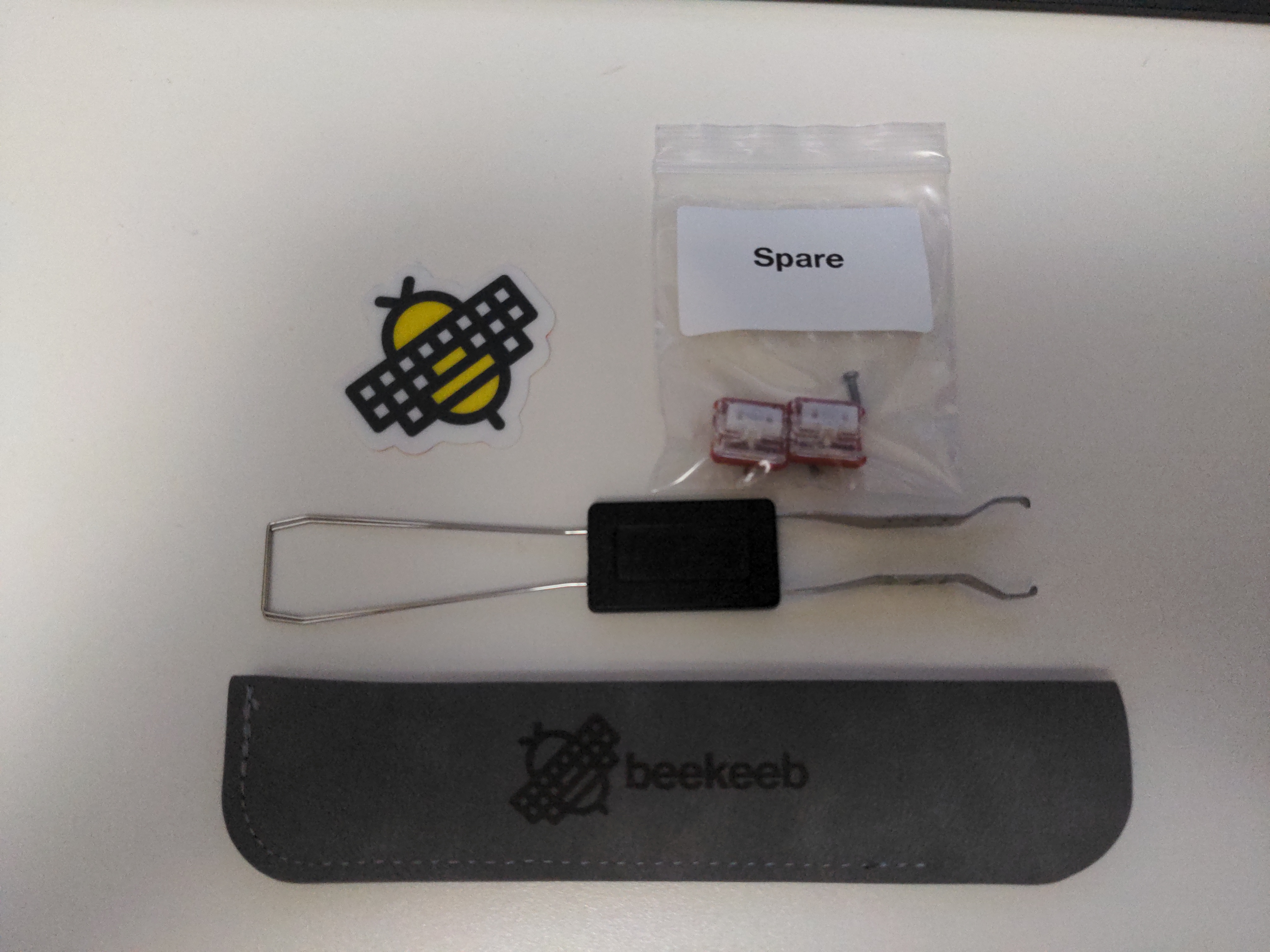
Although there was no well-crafted unboxing experience, the process of going through the box contents felt like Christmas.
After putting the keycaps and rubber feet on, connecting the halves and the entire thing to my laptop, I had a fully functional keyboard.
The switches were smooth, the thumb clusters felt empowering, but the column stagger really punishes you for not doing proper ten-finger typing, which I never learned. My typing habits are kind of all over the place with my regular technique for typing on a traditional row-staggered keyboard involving only seven or eight fingers for alphanumeric characters. This meant I had to relearn to type in order to make the best use of this keyboard.
I didn't want to risk messing up my clumsy yet perfectly functional typing technique by disrupting the muscle memory I have developed. After all, I have a day job that I would've preferred not to get fired from. This is where I decided to take a bet on an alternative layout, hoping that by learning a new layout that I'm only going to use on this new column-staggered keyboard, my QWERTY muscle memory for row-staggered keyboards will stay intact.
I'll do a separate article on layouts, but for the purposes of this one, I'll say that I landed on Colemak Mod-DH. It was only a matter of configuring the keyboard from there on.
Leo pre-flashes the controllers with Vial, an open-source firmware for keyboards that supports real-time configuration via GUI. I could've probably kept that as is, but at that point I already had my sights on Miryoku, an ergonomic minimal layout that uses techniques like home row mods to make better use of the reduced number of keys. I had a really hard time reproducing all the techniques Miryoku uses in Vial, so I decided to simply flash the keyboard with Miryoku QMK, which actually comes with Colemak Mod-DH by default.
I'll go deeper on my thoughts about Miryoku in my article on layouts.
I was all set, the journey of learning the new layout and the new keyboard began. I grinded keybr.com until I got all the letters unlocked, then switched to Monkeytype. I spent at least an hour every day for months until I got to the speed and accuracy I had on QWERTY. Any time I was in a dull meeting or was waiting for a deployment pipeline I would swap the old keyboard with a new one and practice. Sometimes I would type out a comment on Jira or a message on Slack, but I was only fully ready to switch at the two-month mark.
Where I Am Now
As you might have guessed, I'm still using that keyboard. Even though it is used exclusively on my work desk in combination with my work laptop, I do enjoy using it and look forward to typing on it every day. My bet on having a secondary muscle memory for the new layout paid off, my QWERTY typing hasn't really changed much since the switch, and I can seamlessly alternate between the two when needed.
Disappointingly, my typing technique or speed on Piantor hasn't improved much since the switch. The second I became confident in using it as a daily driver, the novelty factor wore off and I stopped practising. I haven't experimented with any new layouts or even changed my config. In fact, those extra pinkie column buttons are still unbound, because Miryoku doesn't use them and I could never find anything useful to put there.
On the bright side, the hardware fared pretty well. I never had to replace a switch or had the keyboard die on me, except for the one time when the right half of my keyboard stopped working.
I haven't figured out what caused it to happen to this day, but reflashing the controllers was enough to solve the issue. I emailed Leo when this happened and he was kind enough to reply even though it was two years after my original purchase. He was ready to help me with troubleshooting (reflashing was actually his idea), but I was glad it wasn't a hardware fault.
I also remember spilling water on it. I unplugged and disassembled it, used paper towels to collect as much moisture as I could and left it out overnight praying it's still alive. 24 hours later I put it back together and it was working fine.
I have nothing to say about the feel, quality, sturdiness, or resilience of the build. I was expecting the experience to be janky or that it would need constant maintenance, but this hasn't turned out to be the case. On the contrary, with the exception of that right half incident, I had little to no headaches caused by the hardware or the software.
Should You Get One?
I don't regret purchasing Piantor. In fact, if something were to happen to mine, I would likely get a similar ergonomic keyboard or maybe even the same Piantor.
However, looking back, I can't think of the entire sequence as anything other than "big boy getting an expensive toy and playing with it for months". For the money I paid for it, I could've gotten a dozen or so high quality mechanical keyboards. In the time I spent relearning to type, I could've completed a personal project, spent more time with family or picked up an actual skill.
Honestly, unless you're already experiencing symptoms or have a high risk of developing a wrist-related condition, ergonomic keyboards are mostly a gimmick. If you think it's a flex that's worth the money and/or time, go for it, but I can't recommend it with a straight face.
The only type of custom keyboard I can recommend to anyone is the one that has a split space bar. There are some regular-looking row-staggered keyboards with a split space bar on the market. With that you can unlock the power of your right thumb, bind that to a backspace and stop there.
However, if you are hell-bent on getting an ergonomic keyboard and there is no convincing you otherwise, Piantor is a good choice, but ordering one online without experiencing it in person first is a huge gamble. I recommend finding a local store or seeing if keyboard nerds host meet-ups in your area where you could try and play around with different boards, layouts and switches.
If you're in Ottawa and are interested in trying Piantor out, email me and we can arrange something.
I have one final note about Piantor. The Piantor V2 that I got doesn't actually have the schematics posted on GitHub. Does it make the new design with USB-C cables proprietary? Yes. The shop doesn't even have a V2 listed. Instead, they have Piantor Pro, which seems to be its own separate thing with controllers integrated into the PCB. This new design does look cool and you can't really blame the guy for doing what he thinks is best for his business, but schematics availability was one of the reasons I was drawn to Piantor in the first place. For a while I felt cheated, but after some time I managed to convince myself that I got a better product and that it was 100% my fault for not checking the schematic availability, before agreeing to the upgrade. Be mindful of that.